
We’ve all been there. You have this incredibly cute photo of your dog, or a beautiful family snapshot from your last vacation, and you think, “This would look amazing as a painting!” So, you run it through an online generator, and… the result looks like a muddy, confusing puzzle of tiny shapes.
Let’s be real: while our free online generator is powerful, it works entirely off the visual information you feed it. If you want a stunning final canvas, starting with the right image is 90% of the battle.
If you’re wondering how to pick the best photos for paint by numbers, you’re in the right place. Here are our top custom paint by numbers tips to ensure your next DIY masterpiece looks exactly the way you envisioned.
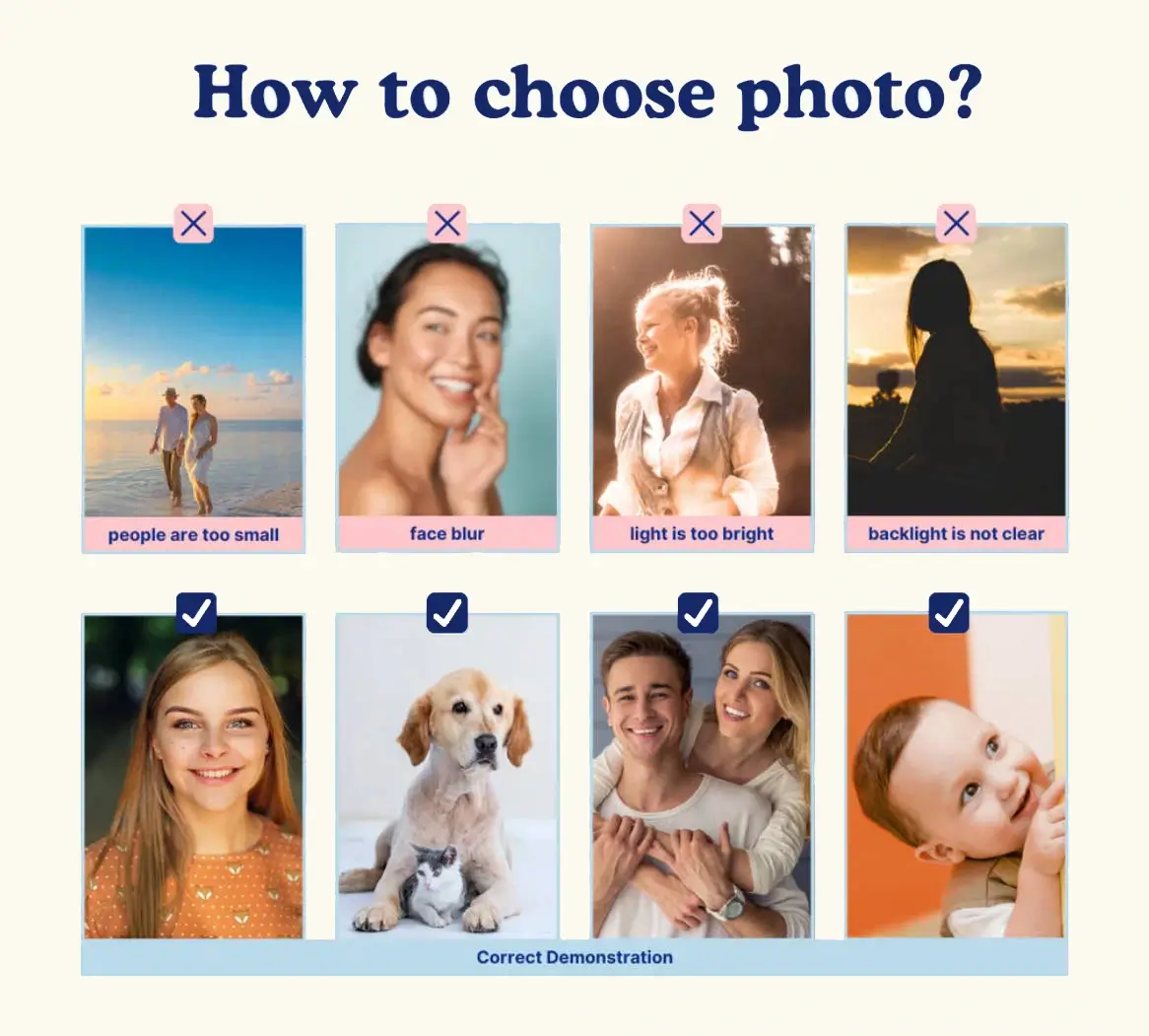
1. Lighting is Everything (Ditch the Shadows)
When we look at a photo, our human brains are smart enough to recognize a face even in a dark shadow. A computer algorithm, however, just sees a big block of dark brown or grey.
- What to look for: Choose photos with bright, even lighting. Natural daylight is your best friend.
- What to avoid: Heavily filtered photos, dark indoor shots, or pictures where half the subject’s face is cast in a dark shadow. You want the colors to be as true to life as possible!
2. Close-Ups Are Your Best Friend
Paint by numbers relies on color zones. If a face in your photo is too small (like a group shot of 10 people taken from across the yard), the generator can only assign a few tiny dots of color to each person. The result? Unrecognizable blobs.
- The golden rule: The subject should take up at least 70% of the frame.
- Pro Tip: If you are painting a portrait of a person or a pet, a crisp head-and-shoulders shot works absolutely perfectly. Don’t be afraid to crop the image before uploading it!
3. Keep the Background Simple
A cluttered background translates to thousands of tiny, frustrating color segments on your canvas. If your cat is posing in front of a messy bookshelf, you’re going to spend hours painting tiny book spines instead of focusing on your furry friend.
- What to look for: Soft, blurred backgrounds (portrait mode on your phone is great for this!), solid colors, or simple landscapes like a clear blue sky or a green lawn.
- The benefit: A simple background not only makes the painting process much more relaxing but also helps the main subject “pop” right off the canvas.
4. High Contrast Equals High Impact
You want distinct, clear differences between the colors in your photo. If your dog has light brown fur, and they are sitting on a light brown rug in front of a light brown wall, the generator will struggle to find the edges of your dog.
- What to look for: Look for colors that complement and stand out against each other. A white dog on a green grassy lawn? Perfect. A person wearing a bright red sweater against a neutral background? Ideal.
Ready to Test It Out?
Finding the perfect picture might take a few tries, and that’s exactly why our browser-based generator is completely free to use. You don’t have to download any heavy apps or commit to buying anything right away.
Simply upload your photo, preview the generated line art and color chart, and see how it looks. If it feels too complicated or muddy, just pick another photo and try again!
Want to skip the hassle of sourcing paints and printing canvases? Once you’ve generated the perfect preview, you can easily order a complete, ready-to-paint kit right from our site. We prep the premium canvas, mix the exact colors you need, and ship it directly from our California workshop to your door.
Grab your favorite photo and try our free generator right here to bring your memories to life!